
Mayo 3D Viewer Download: Free STEP, IGES and STL Viewer and Converter
Open CAD files without a CAD program, measure them, and turn STEP into print-ready STL
Mayo is a free, open-source 3D CAD viewer and converter from Fougue, a French software company. It opens STEP, IGES, STL, OBJ, glTF and a dozen other formats, measures parts and converts files, in a window or from the command line. This Mayo 3D viewer download guide checks GitHub live for the newest official build, then explains how exact CAD geometry becomes a triangle mesh, how the mesh quality changes a printed hole and the file size, and how to convert STEP to STL.
Mayo 3D Viewer Download (Latest Version)
Every official Mayo file is published on the Mayo releases page.
Previous versions
Loading the release list…
macOS: there is no Mac download. The README offers release packages for Windows and Linux only; Mac users build Mayo from source (see the macOS steps).
How this download box works
- It is live. Each visit asks GitHub for the newest stable release of the official
fougue/mayoproject (cached for ten minutes) and links only to files on its release path. - Which file? On Windows, the installer, or the zip if you cannot install software (extract it and run
mayo.exe). On Linux, thex86_64AppImage for Intel and AMD PCs or theaarch64one for 64-bit Arm, new in 0.10.0. - MayoConv AppImages hold only the command-line converter. On Windows the converter is a separate program,
mayo-conv.exe, with no separate release file.
Download Safety and How to Verify the File
Mayo’s official downloads live on the fougue/mayo releases page on GitHub, which the box reads; the README also names winget and Scoop for Windows. Since 0.8.0 every file has a .sha256 file beside it, holding the checksum and file name in the format the Linux sha256sum tool reads, and the box shows GitHub’s SHA-256 for the current files.
Windows (PowerShell)
Get-FileHash .\Mayo-0.10.0-win64-installer.exe -Algorithm SHA256Linux (with the .sha256 file in the same folder)
sha256sum -c Mayo-0.10.0-x86_64.AppImage.sha256Compare the PowerShell value with the box or the .sha256 file (letter case does not matter); sha256sum -c prints OK on a match. If they differ, delete the file and download it again.
Antivirus warning? In 2023 a user’s Symantec quarantined mayo.exe on reputation grounds; the maintainer said an up-to-date Avast scan found nothing and called it a probable false positive. Check the checksum first: a match shows the file is exactly the one the project published.
What Is Mayo?
Mayo is a desktop program for viewing, measuring and converting 3D CAD files. It is not a modeller and cannot create or edit geometry. It opens the files that CAD programs, scanners and slicers exchange, shows them with engineering tools and writes them out in another format, which makes it a good companion to FreeCAD or SolveSpace.
It comes from Fougue SAS of Montceau-les-Mines, France, which writes custom software for CAD/CAM, machine-tool simulation and 3D visualisation (the About box reads “Mayo By Fougue”), and has been developed on GitHub as fougue/mayo since 2016. It is written in C++ with Qt for the interface and OpenCascade for the geometry, including the mesher that turns CAD surfaces into the triangles you see and export.
It is free under the permissive BSD 2-Clause licence: you may use, modify and redistribute it if the copyright notice, the two conditions and the disclaimer go with it, and it comes with no warranty. There is no paid edition or account, and the interface is in English, French or Chinese.
Opens 17 formats
From STEP, IGES and DXF to STL, 3MF, OBJ, glTF and FBX, per the README; it writes ten of them.
Measures
Diameters, distances, angles, lengths, areas and bounding boxes, in metric or imperial units.
Looks inside
Clip planes with capped cut faces, exploded assemblies and per-part visibility.
Familiar controls
Navigation styles that mimic CATIA, SOLIDWORKS, Unigraphics and ProEngineer.
What’s New in Mayo 0.10.0
When this guide was checked on 1 November 2026, the newest stable release was Mayo 0.10.0, published on 3 July 2026; its notes point to the 0.10.0 milestone on GitHub for the changes. The box above always shows the newest version, even after this table ages.
| Version | Date | Main changes |
|---|---|---|
| 0.10.0 | 3 Jul 2026 | First Linux Arm64 AppImages. Fixes for STEP files stuck while loading, frozen imports and results that differed between the window and the converter. Sums of angle and distance measurements, better DXF loading and macOS fixes. |
| 0.9.0 | 13 Jan 2025 | The converter became a separate program. Bounding-box measurement, automatic reload of changed files, DirectX reading. |
| 0.8.0 | 20 Dec 2023 | A portable Windows zip, and an Assimp plug-in for reading 3MF, FBX, Collada and AMF. |
Older releases go back to 0.2.0 (July 2020); up to 0.5.2 they were Windows-only.
System Requirements
| System | What the project says |
|---|---|
| Windows | 64-bit installer and portable zip; no minimum Windows version is stated. |
| Linux | AppImages for x86-64 and Arm64, built on Ubuntu 20.04; the 0.9.0 and earlier notes warn that older distributions might fail. |
| macOS | No package. The README says Mayo runs on macOS; the wiki explains how to build it. |
| Graphics | OpenGL through OpenCascade: the preferred 3D widget needs OpenGL 2.0 or newer, otherwise a simpler fallback is used. |
How to Install Mayo
Windows
- Installer: run
Mayo-0.10.0-win64-installer.exeand follow the prompts. Since 0.9.0 it copies the Visual C++ runtime files Mayo needs itself, instead of running Microsoft’s redistributable installer. - Portable zip: on a PC where you cannot install software, extract
Mayo-0.10.0-win64-binaries.zipanywhere and startmayo.exe. - winget or Scoop: listed in the README; check which version they install, as package catalogues can lag behind GitHub.
winget install --id Fougue.Mayo

scoop bucket add extras
scoop install extras/mayo
Linux
Download the AppImage for your processor, make it executable and run it. If it fails on an old distribution, remember it is built on Ubuntu 20.04; the wiki also explains how to build Mayo on Debian, Ubuntu, Fedora and Arch.
chmod +x Mayo-0.10.0-x86_64.AppImage
./Mayo-0.10.0-x86_64.AppImage
macOS (build from source)
The wiki builds Mayo with Homebrew, CMake and a C++17 compiler, against Qt 5.14 or newer (Qt 5 or 6) and OpenCascade 7.4.0 or newer. Assimp is optional and adds formats such as FBX, Collada and 3MF. Its commands:
brew install cmake git
brew install qt@5
brew link qt@5 --force
brew install opencascade
brew install assimp
git clone https://github.com/fougue/mayo.git
mkdir build-mayo && cd build-mayo
cmake ../mayo -DMayo_BuildPluginAssimp=ON
cmake --build . --config Release
./mayo.app/Contents/MacOS/mayo
A plain clone builds the development branch; add --branch v0.10.0 to the clone command to build the release itself.
CAD Formats Explained: Exact Geometry vs Triangle Meshes
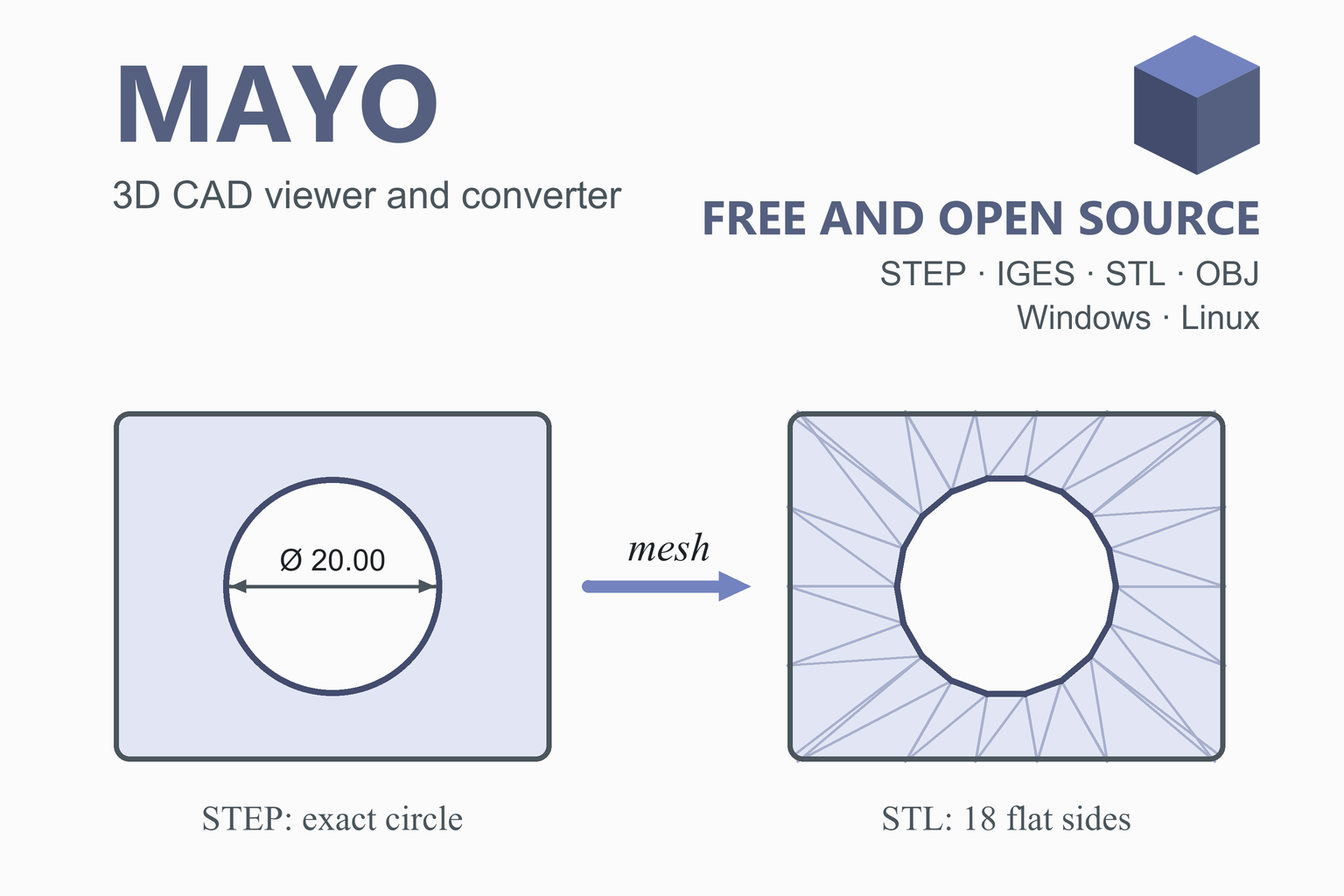
Every format Mayo opens belongs to one of two families. CAD programs describe a solid by its boundary representation (B-rep): faces on exact surfaces such as planes, cylinders and free-form NURBS, trimmed by exact curves. A 20 mm hole is stored as a cylinder of radius exactly 10 mm, so you can measure its true size and mesh it later at any resolution. STEP (ISO 10303), the neutral exchange format of most CAD programs, works this way and can also carry the assembly tree, names and colours. The older IGES format and OpenCascade’s own BREP format store exact geometry too.
A mesh describes only the surface, as flat triangles whose corners lie on the original shape: a circle becomes a polygon, and the resolution is fixed when the mesh is made. STL holds nothing but triangles, with no units (slicers normally assume millimetres), colours or assembly; 3MF packs meshes with units, colours, materials and several objects into one file.
| Format | Kind | Open | Save | Notes |
|---|---|---|---|---|
| STEP | Exact geometry | Yes | Yes | AP203, AP214, AP242 (partly); writes AP214 by default |
| IGES | Exact geometry | Yes | Yes | Version 5.3; exports trimmed surfaces unless “BRep Mode” is changed |
| BREP | Exact geometry | Yes | Yes | OpenCascade’s own format |
| DXF | Drawing geometry | Yes | No | 2D drawings; also 3D meshes |
| STL | Mesh | Yes | Yes | Text (ASCII) or binary |
| OBJ, glTF/GLB, VRML | Mesh | Yes | Yes | glTF 1.0, 2.0 and GLB; VRML 2.0 |
| PLY, OFF | Mesh | Yes | Yes | Colours; PLY also point clouds |
| AMF | Mesh | Yes | Yes | Optional libraries |
| 3MF, 3DS, FBX, Collada, X3D, DirectX | Mesh | Yes | No | Optional library |
| Image | Picture | No | Yes | PNG, JPEG and more |
To see what your copy can open and save, use Help, System Information or run mayo-conv --system-info; both list the import and export formats.
Mesh Quality: Tessellation, Print Quality and File Size
Turning exact surfaces into triangles is called tessellation. Mayo does it whenever it opens a STEP, IGES, BREP or DXF file, and an STL export writes out those same triangles: the mesh you see is the mesh you get.
Picture a hole drawn with straight segments whose ends sit on the true circle. Each segment (a chord) cuts inside its arc, and the largest gap is the chordal deflection, or chord error. For a radius r and chord error s, the segments needed are:
N = π ÷ arccos(1 − s/r), rounded up
The angular deflection limits the angle between neighbouring segments, so a 20° limit gives any full circle at least 360 ÷ 20 = 18 segments, however small. The chord rule looks after big gentle curves, the angle rule after small holes and fillets.
| Chord error | Segments | Largest pin that fits, smaller by |
|---|---|---|
| 0.20 mm | 16 | 0.38 mm |
| 0.10 mm | 23 | 0.19 mm |
| 0.05 mm | 32 | 0.10 mm |
| 0.01 mm | 71 | 0.02 mm |
That last column is the engineering point: every chord lies inside its arc, so a tessellated hole is always slightly tighter than drawn and a peg slightly thinner. Design 0.2 mm of diametral clearance for a steel dowel, and a 0.1 mm chord error can use almost all of it before the printer adds its own error.
Finer meshes cost file size. Halving the chord error multiplies the triangles by about 1.4 on a cylinder and about 2 on surfaces curved both ways, such as fillets. A binary STL stores 50 bytes per triangle (a normal and three corners as 32-bit numbers, plus two spare bytes), so 100,000 triangles take about 5 MB; text STL is several times larger.
Mayo’s settings
They are in Tools, Options, group BRep Meshing. Quality has five presets plus User Defined; Normal is the default. According to the 0.10.0 source code, each preset scales the chord error with the size of what you opened (the longest side of its bounding box) and fixes the angle step:
| Quality | Chord error | Angle step | Segments per circle (min.) | Chord error, 100 mm part |
|---|---|---|---|---|
| Very Coarse | 3.2% of size | 80° | 9 | 3.2 mm |
| Coarse | 1.6% of size | 40° | 18 | 1.6 mm |
| Normal | 0.4% of size | 20° | 36 | 0.4 mm |
| Precise | 0.1% of size | 10° | 72 | 0.1 mm |
| Very Precise | 0.05% of size | 5° | 144 | 0.05 mm |
Two things follow. On a typical printed part the angle step usually decides the facets, and OpenCascade’s edge mesher uses half of it (and half the chord error) on edges such as hole outlines: a 20 mm hole gets 36 sides at Normal (the largest pin that fits is about 0.08 mm smaller), 72 at Precise (0.02 mm) and 144 at Very Precise (0.005 mm). And because the chord error follows the size of the whole file, a small part inside a one-metre assembly gets a far larger chord error than on its own, which shows on gently curved and free-form faces (the angle step still limits small holes); open the part’s own file, or raise the quality, before exporting it.
User Defined unlocks Chordal Deflection (default 1 mm), Angular Deflection (default 20°) and Relative, which scales each edge’s limit with its size. Change one value at a time and check the result.
Suggestion (this guide’s, not the project’s): Precise for most printed parts, Very Precise for small parts and tight fits, Normal for viewing, Coarse when a huge assembly is slow to open. Check curved faces in your slicer’s preview before printing.
Convert STEP to STL, Step by Step
A supplier or a parts library sends a STEP file, and your slicer wants an STL. In the Mayo window:
- Set the quality first. In Tools, Options, BRep Meshing, set Quality (Precise suits most prints); Mayo meshes a file as it opens it, so later changes only apply to files opened afterwards. Under Export, STL, leave Target Format on Binary.
- Open the file with File, Open, or drag it onto the window.
- Check it. Rotate with the left mouse button, pan with the right, zoom with the wheel. Use Measure shapes to check a key dimension and a Bounding Box measure to compare the size with your build volume.
- Select what to export in the model tree: one part, several with Ctrl-click or Shift-click, or the document for everything. With nothing selected Mayo warns “No item selected for export”.
- Export with File, Export selected items and a file name ending in
.stl. Since 0.10.0 Mayo takes the format from the file name, so the extension matters. - Inspect the STL in Mayo or your slicer. If holes and curves look faceted, raise the quality, open the STEP file again and re-export.
Keep the STEP file as the master copy; the STL’s triangles are final. Everything selected goes into one STL, so export parts separately if you want to arrange them in the slicer. Mayo works in millimetres (its STEP export option says other units mean converting the model), so the STL normally comes out in the millimetres slicers expect.
Batch Conversion with MayoConv
MayoConv converts files without a window: it is the MayoConv AppImage on Linux and mayo-conv.exe on Windows. The output format comes from the name after --export (short form -e, which can be repeated).
# Linux
./MayoConv-0.10.0-x86_64.AppImage bracket.step --export bracket.stl

# Windows, in the folder that contains mayo-conv.exe
.\mayo-conv.exe bracket.step -e bracket.stl -e bracket.igs

# Linux (bash): every .step file in the folder
for f in *.step; do ./MayoConv-0.10.0-x86_64.AppImage "$f" --export "${f%.step}.stl"; done
The converter keeps its own settings, so Precise chosen in the window does not apply to it. The maintainer’s fix: set your options in Mayo, click Exchange, then Save as… in the Options dialog to write an INI file, and pass it with --use-settings print.ini. Add --cache-settings to keep those settings for later runs.
Headless Linux server? File conversion needs no screen. The 0.10.0 notes say a virtual X server is only required for operations that render 3D, such as picture export; run those under xvfb-run --auto-servernum.
Measuring Parts in Mayo
Click Measure shapes in the 3D view, pick a type and units, then click what to measure.
| Measure | Click | Use it for |
|---|---|---|
| Circle Center, Circle Diameter | A circular edge | Hole and boss sizes and positions |
| Min Distance, Center-to-center Distance | Two entities | Wall thickness, clearances, hole spacing |
| Angle, Length | Edges | Chamfers, drafts, edge lengths |
| Vertex Position, Surface Area | A vertex, faces | Coordinates; areas for coating or gluing |
| Bounding Box | A shape | Overall size against your build volume |
Measure the STEP file rather than an STL: the tools are built for exact geometry, where a hole is a true circle. And note that the bounding box’s volume is length × width × height of the box around the part: it tells you whether a part fits on the bed, not how much filament it needs.
Opening Large Assemblies
A machine or a supplier’s product model can hold thousands of faces, and Mayo meshes them all on opening:
- Lower the quality first. For a STEP assembly that got stuck while loading, the maintainer’s workaround was setting Quality to Coarse before opening it; raise it again before exporting for print.
- Read only the structure. In the STEP import options, Assembly Level set to Structure reads the assembly tree without shapes.
- Hide what you do not need with the model-tree checkboxes or the 3D view’s Show only selection.
- Look inside with clip planes and the explode tool; if an assembly will not explode, check Automatic Expansion of Compounds to Assemblies under Import.
- Keep it current. Action After Document File Change can reload a file automatically when your CAD program saves a new version.
Mayo vs Other Free Tools
| Program | Main job | Reach for it when |
|---|---|---|
| Mayo | Viewing, measuring and converting CAD and mesh files | You need to open, check or convert a file, such as STEP to STL |
| FreeCAD | Parametric 3D modelling | You need to change the design itself |
| SolveSpace | Parametric 2D and 3D CAD | You want a parametric modeller with a constraint solver |
| OpenSCAD | Solid modelling written as code | You prefer to describe parts in a script |
| MeshLab | Processing and editing triangle meshes | An STL or a scan needs cleaning or repair |
| Blender | 3D creation software | You work with artistic or organic models |
For more modellers, see the best free CAD software for 3D printing; for the step after the STL, our 3D printer slicer comparison.
Pros and Cons
Strengths
- Free and open source (BSD 2-Clause), no account.
- Opens exact CAD formats as well as common meshes.
- Measures true geometry.
- Clear control over tessellation.
- A command-line converter for batches and servers.
- Checksum files for each download (since 0.8.0), and Arm64 Linux builds.
Limits
- No macOS download.
- A viewer, not a modeller: no editing or repair.
- 3MF can be opened but not saved.
- Quality must be set before opening a file.
- The converter keeps separate settings.
- Brief release notes and no published system requirements.
Troubleshooting
| Problem | What to try |
|---|---|
| The AppImage does not start | Run chmod +x on it. The AppImages are built on Ubuntu 20.04, and older distributions might fail. |
| The 3D view stays empty or black | Tick Force OpenGL Fallback Widget under Tools, Options, Application and restart; its description says the default path can leave the 3D window empty for some users. |
| A big STEP file seems stuck | Update to 0.10.0, which fixed one such hang, and set Quality to Coarse before opening. |
| The STL is faceted, or holes print tight | Raise Quality, open the STEP file again and re-export. |
| “No supporting writer” on export | Type the extension (.stl, .step): the format comes from the file name. Help, System Information lists the formats your copy writes. |
| Mayo and MayoConv give different meshes | Save the options as an INI file (Exchange, Save as…) and run the converter with --use-settings. |
| 3MF or FBX files are not offered | They need the optional Assimp library; check Help, System Information. |
An antivirus quarantines mayo.exe | Compare the SHA-256 with the release page first. |
Frequently Asked Questions
Is Mayo free?
Yes. Mayo is free and open source under the BSD 2-Clause licence, with no paid edition and no account. The release notes invite users to sponsor the project on GitHub, which is optional.
Who makes Mayo?
Fougue SAS, a French company in Montceau-les-Mines that writes custom software for CAD/CAM and 3D visualisation. Mayo is developed in the open on GitHub as fougue/mayo.
Is there a Mayo download for macOS?
No. The README says Mayo runs on macOS, but release packages exist only for Windows and Linux. Mac users can build it from source with the wiki’s steps (Homebrew, Qt, OpenCascade and CMake).
Which Mayo file should I download?
On Windows, the 64-bit installer (or the zip, if you cannot install software). On Linux, the x86_64 AppImage for Intel and AMD PCs or aarch64 for 64-bit Arm. MayoConv files contain only the command-line converter.
Can Mayo convert STEP to STL?
Yes. Set the mesh quality first, open the STEP file, select the parts in the model tree and use File, Export selected items with a name ending in .stl. MayoConv does the same from the command line.
Why does my STL from Mayo look faceted?
The mesh quality was low when Mayo opened the STEP file, and the STL contains that same mesh. Raise Quality to Precise or Very Precise, open the STEP file again and re-export.
Can Mayo edit or repair a model?
No. Mayo views, measures and converts; it has no tools for changing geometry. Edit the design in a CAD program such as FreeCAD, and repair meshes in a mesh tool such as MeshLab.
Can Mayo open 3MF files?
It can open 3MF but not save it. The wiki says 3MF reading needs the optional Assimp library; Help, System Information shows whether your copy has it.
What is MayoConv, and do I need it?
MayoConv is the command-line converter (mayo-conv.exe on Windows, a separate AppImage on Linux) for scripts and servers. It keeps its own settings; pass the ones saved from Mayo’s Options dialog with --use-settings.
Is Mayo safe to download?
Download it only from the official fougue/mayo releases page on GitHub, where the box on this page links. Every current file has a .sha256 checksum file; a matching checksum shows the file is exactly the one the project published.
More guides: FreeCAD · SolveSpace · OpenSCAD · MeshLab · Blender · Best free CAD software for 3D printing · Best 3D printer slicers · Orca Slicer · PrusaSlicer · Engineering calculators