
SolveSpace Download: Free Parametric 2D/3D CAD for Windows, macOS and Linux
The newest official build, checked live against GitHub, plus a plain-English guide to constraints and a first printable part
SolveSpace is a small, free and open-source parametric CAD program. You sketch roughly, state the facts that matter (this line is horizontal, that hole is 5 mm across) and its constraint solver moves the geometry until every fact is true; then you extrude the sketch into a solid and export STL for your slicer. This SolveSpace download guide picks the right file, shows how to check and install it, explains degrees of freedom and the solver, and walks you through a first printable part with exact dimensions.
SolveSpace Download
Or use the official page: SolveSpace download page
Linux: the project attaches no ready-made Linux file to its GitHub releases, only Windows and macOS builds and a source archive. Install it from Flathub, the Snap Store or your distribution’s packages, or build it from source, as described in the install section. Note that the Flathub and Snap versions can lag behind the newest release.
Previous versions
Loading the release list…
How this download box works
- It is live. Each visit asks GitHub for the newest stable release of the official
solvespace/solvespaceproject (cached for ten minutes; Refresh asks again). Every link goes to the project’s own release files. - Windows has four files. The download page says to pick
solvespace_<architecture>.exe; the main button here issolvespace_x64.exe, the 64-bit build that uses several cores through OpenMP. The single-core files leave OpenMP out and need no extra Microsoft runtime. Thex86files are 32-bit; the README says the 64-bit builds do not support 3D mice such as the SpaceMouse. - macOS has one disk image holding a single app for Apple Silicon and Intel Macs, according to the project’s release build scripts.
- The file names carry no version, so the box adds it, as in “solvespace_x64.exe (release v3.3)”. The saved file is just
solvespace_x64.exe. - Dates are GitHub’s, in UTC. The website gives 20 October 2026 for 3.3; GitHub shows 21 October.
- Test builds are not offered. Release candidates are left out (the box mentions a newer one if it appears), and the README’s automatic “edge” builds are not GitHub releases.
Download Safety and How to Verify the File
The official download page links each version to its GitHub release, and the README says the maintainers build those packages automatically for each stable release. The box reads only from there, so avoid mirror and “free download” sites.
The project’s release workflow signs and notarises the macOS disk image but has no code-signing step for the Windows .exe files, so Windows SmartScreen may warn about them. That makes the checksum check below worth the minute it takes.
Check the SHA-256 checksum
A checksum is a fingerprint of the file. If the fingerprint of your download matches the one shown beside the file in the box, the file is exactly what the project published.
Windows (PowerShell)
Get-FileHash .\solvespace_x64.exe -Algorithm SHA256macOS (Terminal)
shasum -a 256 ~/Downloads/SolveSpace.dmgCompare the printed value with the full SHA-256 (“Copy full” in the box). If it differs, delete the file and download it again.
What Is SolveSpace?
The project describes SolveSpace as a free (GPLv3) parametric 3D CAD tool, and its repository as “parametric 2d/3d CAD”. Parametric means the model is driven by numbers and rules you can change later. Its home page lists 3D parts (extrudes, revolves, helixes and Boolean operations), flat 2D parts exported as DXF, PDF or SVG, 3D-printed parts exported as STL, CAM data for laser, waterjet or machining work, and mechanism design, where the solver simulates linkages.
SolveSpace was written by Jonathan Westhues, who made the original 2.0 release. The contact page names whitequark as maintainer from 2015 to 2020 and Paul Kahler from 2020, plus many other contributors. The code is on GitHub as solvespace/solvespace under the GNU GPL version 3 or later, so it is free for any use, with no account.
Files are saved as .slvs. An experimental web version on the official website is built from the development branch and, the project says, still has many bugs.
What’s New in SolveSpace 3.3
When this guide was checked on 1 November 2026, the newest stable release was SolveSpace 3.3 (20 October 2026 on the official download page). The forum announcement calls it mainly a bug-fix release with fewer NURBS problems. The changelog lists:
- Geometry kernel (NURBS): many fixes for flat and curved surfaces, with a significant reduction in red lines, naked edges and missing surfaces.
- Solver: copes better with large dimensions, solves some valid sketches that used to fail to converge, and no longer deletes constraints it cannot satisfy (a 3.2 regression).
- Other: file-dialog and font fixes, a multi-threaded web version, and a Brazilian Portuguese translation.
Version 3.2 (26 March 2026) was the bigger update: face-to-face parallel and perpendicular constraints, constraints applied to many entities at once, arcs dimensioned by radius by default, STEP export as solid models and an optional Qt interface for Linux builds. Version 3.1 (2022) made sketches with many constraints solve about eight times faster.
| Version | Released | Platforms on the download page |
|---|---|---|
| 3.3 | 20 Oct 2026 | Windows Vista to 11, Linux, Mac |
| 3.2 | 26 Mar 2026 | Windows Vista to 11, Linux, Mac |
| 3.1 | 1 Jun 2022 | Windows Vista to 10, Linux, Mac |
| 3.0 | 17 Apr 2021 | Windows Vista to 10, Linux, Mac |
Files saved by a newer version may open in an older one, but newer features will not work there.
System Requirements
| System | What the project says |
|---|---|
| Windows | Windows Vista to 11, 64-bit or 32-bit. No installer: one .exe of about 8 to 9 MB. No Arm64 build. |
| macOS | One disk image of about 13 MB holding a single app for Apple Silicon and Intel. The 3.3 build files set macOS 10.12 as the minimum version (the README still mentions 10.6). Only the Apple Silicon part of the app uses OpenMP. |
| Linux | No file on GitHub. Flathub (x86-64 and Arm64), the Snap Store, distribution packages, or a build from source (CMake, zlib, libpng, cairo, freetype, plus GTK 3 or Qt 6 for the interface). |
How to Install SolveSpace
Windows
- Download
solvespace_x64.exefrom the box above. No installation is needed: save it in a folder you keep and run it from there. - Double-click it. If SmartScreen says it protected your PC, check the checksum first, then choose More info and Run anyway (general Windows advice).
- If Windows reports a missing DLL, install the Microsoft Visual C++ Redistributable from Microsoft (the x64 one for 64-bit files, the x86 one for 32-bit files), or use
solvespace_single_core_x64.exe, which does not need it.
macOS
- Download
SolveSpace.dmgand open it. - Run the app straight from the disk image, or drag it to Applications to keep it, as the download page describes.
Linux
- Flathub. The README lists the official Flatpak,
com.solvespace.SolveSpace. When checked on 1 November 2026, Flathub still offered 3.2; on the official forum the maintainer said they were not sure how it gets updated and had opened an issue on GitHub.flatpak install flathub com.solvespace.SolveSpace flatpak run com.solvespace.SolveSpace - Snap Store. The download page links the Snap, but its stable channel still offered version 3.1 (June 2022) for 64-bit PCs, and 3.0 for Arm, when checked.
sudo snap install solvespace - Your distribution. The download page says you may find SolveSpace in your package manager. Search for
solvespaceand check which version it installs. - Build 3.3 from source. When checked on 1 November 2026, this was the only way to get the newest release on Linux. The 3.3 README’s steps for Debian and Ubuntu (it also gives a Fedora line):
sudo apt install git build-essential cmake zlib1g-dev libpng-dev \
            libcairo2-dev libfreetype6-dev libjson-c-dev \
            libfontconfig1-dev libpangomm-1.4-dev libgl-dev \
            libglu-dev libspnav-dev libgtkmm-3.0-dev qt6-base-dev
git clone https://github.com/solvespace/solvespace
cd solvespace
git checkout v3.3
git submodule update --init
mkdir build && cd build
cmake .. -DCMAKE_BUILD_TYPE=Release -DENABLE_OPENMP=ON
make
sudo make install
git checkout v3.3selects the release; the program appears asbuild/bin/solvespace.
How SolveSpace Thinks: Constraints and Degrees of Freedom
A degree of freedom (DOF) is one independent way the geometry can still move. In a flat sketch a point has two, its X and its Y, so a line segment (two points) has four. A circle has three: centre X, centre Y and diameter. The official constraints tutorial adds that an arc has five.
A constraint is a geometric fact that removes freedom. Most remove one DOF; some remove two. A sketch with zero DOF is fully constrained: its shape, size and position are completely defined, and nothing moves when you try to drag it.
| Constrain menu | Select | Fact it adds | DOF removed |
|---|---|---|---|
| Distance / Diameter (D) | a line, two points, a point and a line, or a circle | a length, a distance or a diameter | 1 |
| Horizontal (H), Vertical (V) | a line or two points | alignment with the workplane’s axes | 1 |
| On Point / Curve / Plane (O) | two points, or a point and a line or circle | coincident points, or a point on a curve | 2 for two points, 1 for a point on a line |
| Parallel / Tangent (L), Perpendicular ([) | two lines | a fixed direction between them | 1 |
| Angle / Equal Angle (N) | two lines | an angle | 1 |
| Equal Length / Radius (Q) | two lines, or two circles or arcs | equal size | 1 |
| Symmetric (Y) | two points | mirror positions | 2 |
What the solver does
SolveSpace turns every constraint into one or more equations and solves them together with a modified Newton’s method: guess, measure how far each equation is from true, correct all unknowns at once, repeat. The technology page’s example: a point 10 mm from the origin, 5 mm from the X axis and at 65° to the Z axis is three equations in three unknowns, solving to (8.66, 2.67, 4.23).
With free DOF left, it uses a least-squares solution that moves things as little as possible. Three outcomes are worth recognising:
- Over-constrained. A redundant or contradictory constraint (a triangle given all three angles) turns the background red, and the Property Browser lists constraints you could remove, or use .
- Not converging. Impossible values, such as a triangle with sides 2, 3 and 7, cannot be solved.
- The wrong solution. Constraints often allow several shapes; the solver picks the one nearest your sketch, so draw roughly to shape first. Signed point-to-line distances do not flip, and makes big changes in stages.
Why a fully constrained sketch matters
SolveSpace never forces zero DOF, and the official bracket tutorial does not fully constrain its sketch. For a part you will print and revise, though, zero DOF means every number is one you chose: nothing drifts when you nudge a point, and a changed dimension makes the part follow your rules (holes stay 10 mm from the ends) rather than wherever the solver finds convenient. That is design intent. To find what is still free, use (the manual calls it Show Degrees of Freedom), which marks free points with cyan squares.
Your First Printable Part, Step by Step
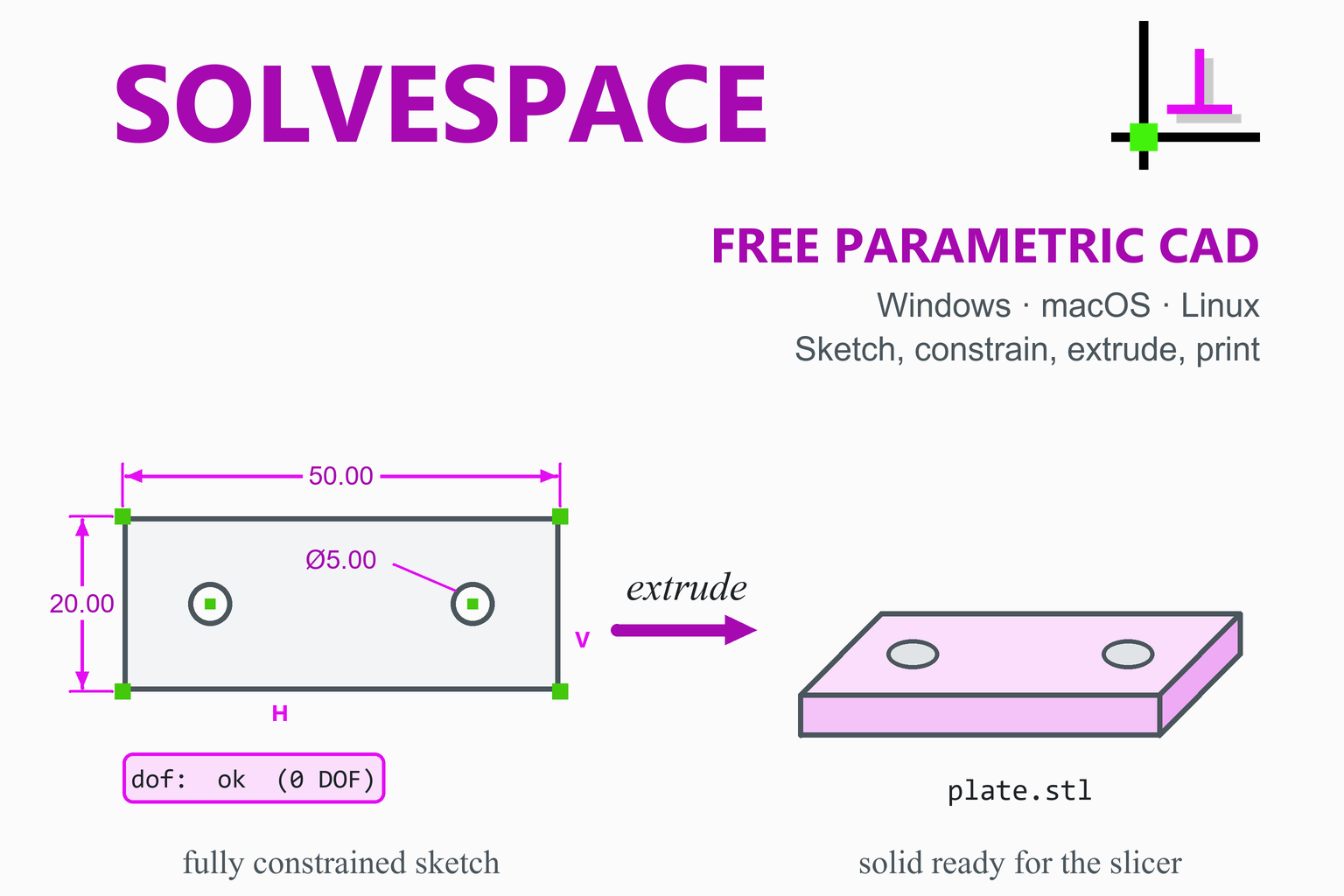
We will draw a flat mounting plate, 50 × 20 × 4 mm, with two 5 mm holes whose centres sit 10 mm from each end. Outline and holes go in one sketch, extruded once, as the reference manual recommends. Menu names are those of version 3.3. Watch the dof column on the Property Browser’s home screen (press Esc to get there): it shows the remaining DOF, or ok at zero.
- Start and save. A new file opens with a workplane on the XY plane active, in group
g002-sketch-in-plane, in millimetres. Save with . Right-drag pans, centre-drag rotates, the wheel zooms. - Draw the outline. Choose (R) and click two opposite corners in empty space near the origin. Its four lines come with coincident, horizontal and vertical constraints, so 4 DOF remain: position (2), width and height.
- Pin it to the origin. Click the bottom-left corner, then the origin, so both turn red, and choose . 2 DOF.
- Size it. Select the bottom line and choose ; a box opens, so type
50and press Enter (1 DOF). Do the same for the left line with20. The dof column now reads ok. - Add the holes. Choose , click a centre in empty space inside the plate, then click again to set the size. Draw a second circle. Each circle adds three: 6 DOF. Keep clicks clear of highlighted geometry, or SolveSpace adds automatic constraints.
- Make them equal, then size one. Select both circles and choose (the tutorials call it Equal Length / Radius / Angle): 5 DOF. Select one circle, choose and enter
5, which is a diameter for a circle: 4 DOF. - Line the centres up. Select both centre points and choose : 3 DOF.
- Place them by design intent. Select the left centre and the left edge, then and
10: 2 DOF. Repeat with the right centre and right edge: 1 DOF. Finally the left centre and the bottom edge,10: ok. These signed distances cannot flip the holes outside the plate. - Extrude. Choose (Shift+X). A new group,
g003-extrude, turns the sketch into a solid with one DOF: its depth. Rotate the view, select one of the short edges that runs along the extrusion, and use with4. In an extrude group constraints work in true 3D, so this is the real thickness. - Check the solid. should answer “Zero problematic edges, good.”, meaning the mesh is watertight. is a sanity check: 50 × 20 × 4 = 4,000 mm³, minus two holes of π × 2.5² × 4 ≈ 78.5 mm³ each, leaves about 3,843 mm³, which SolveSpace displays as about 3.84 cm³; the mesh figure should be within about 1%.
- Export the STL. With the extrude group still active (SolveSpace exports the mesh of the active group), choose , pick the STL type and save
plate.stl. STL has no units; SolveSpace writes millimetres by default, as slicers expect. - Slice it. Open the STL in a slicer such as Orca Slicer, PrusaSlicer or Cura (for resin printers, CHITUBOX). Print it flat side down so the holes are vertical and need no support.
The payoff: change it in seconds
Activate g002 again (its radio button on the home screen), double-click the 50 dimension and type 60. Both holes stay 10 mm from their ends, and the solid follows when you activate g003. The hole spacing was never typed in; to display it, select the two centres and add , which reports a value without driving the geometry.
Engineering note. Thickness is the cheap way to stiffen a plate: bending stiffness grows with the cube of the thickness (second moment of area I = b·h³/12), so going from 4 to 6 mm makes it about (6/4)³ ≈ 3.4 times stiffer. Try the numbers in our moment of inertia calculator and beam deflection calculator. Holes also raise local stress; for a small hole in a wide plate under tension the classic factor is about 3, which our stress concentration factor calculator explains.
Settings and Ideas Worth Knowing
Why printed holes come out small: chord tolerance
STL describes every curve with flat triangles. The export chord tolerance (, default 0.1 mm) is the largest gap allowed between the true curve and the straight segments that replace it. The segments join points on the circle, so they sit inside it: holes get slightly smaller, pegs slightly thinner. Geometry gives the gap as s = r(1 − cos(θ/2)) for a segment spanning angle θ; at the 0.1 mm limit a 5 mm hole is up to 0.2 mm narrower across its flats. Setting 0.01 mm before export makes that negligible, at the cost of a bigger file. Printing tends to shrink small holes too, so test-fit critical ones.
Groups, the Property Browser and other useful habits
- Groups are your history. Activate an earlier group on the home screen to edit it; later groups update.
- Round corners in the sketch with ; choose it with nothing selected to set the radius. SolveSpace has no fillet tool for 3D edges.
- STEP for other CAD, STL for printing. writes exact surfaces as STEP, always in millimetres.
SolveSpace vs FreeCAD and OpenSCAD
All three are free, open source and run on Windows, macOS and Linux, but they work in very different ways. The table sticks to what each project documents.
| SolveSpace | FreeCAD | OpenSCAD | |
|---|---|---|---|
| How you model | Constrained sketches, then extrude, lathe, revolve or helix, combined by union, difference or intersection | Constrained sketches in the Sketcher, then features in Part Design and many other workbenches | You write a script; the model is built from primitives, Boolean (CSG) operations and extruded 2D shapes |
| Exact export (STEP) | Yes | Yes, plus IGES and many more | Not in the documented export list |
| Files for printing | STL, OBJ, VRML, Three.js (no 3MF) | STL, OBJ and others | STL, OFF, AMF, 3MF |
| Opening other CAD files | Imports DXF and DWG; links STL; no STEP import | Imports STEP, IGES, DXF, STL and many more | Reads STL, OFF and DXF files |
| Extras | Linkage simulation, interference check, simple G-code for 2D parts | Assembly workbench (since 1.0), FEM analysis, CAM, technical drawings, Python | Customizer for parameters; designs are plain text files |
| Licence | GPL v3 or later | LGPL 2.1 | GPL v2 |
| Download size | About 9 to 13 MB | Several hundred MB | Tens of MB |
Our suggestion: SolveSpace for quick, precise parts, flat parts for cutting and learning constraints in a small program; FreeCAD for 3D fillets, STEP import, drawings or analysis; OpenSCAD to describe parts in code. Our guide to the best free CAD software for 3D printing compares more options.
Pros and Cons
Strengths
- Free for any use (GPL v3 or later), no account.
- Tiny: one 9 MB file on Windows, no installer.
- The solver shows DOF per group and lists the constraints to remove when a sketch fails.
- STEP export of exact surfaces as well as STL.
- Mechanism simulation, assemblies and 2D output (DXF, PDF, SVG, G-code).
- Signed and notarised macOS build for Apple Silicon and Intel.
Limits
- No ready-made Linux file on GitHub; Flathub and Snap lag behind.
- No 3D fillets or chamfers, no STEP import, no 3MF export.
- NURBS Booleans can fail on some geometry (much improved in 3.3).
- A group can hold at most 2,048 unknowns.
- The 64-bit Windows builds do not support 3D mice.
- Some tutorials and the manual use older menu names.
Troubleshooting
| Problem | What to try |
|---|---|
Windows says a DLL is missing (often VCOMP140.dll) | The multi-core build needs the Microsoft Visual C++ Redistributable. Install it, or use the single-core file. |
| The background turns red and the Property Browser says “SOLVE FAILED!” | The sketch is over-constrained or impossible. Delete one of the listed constraints, or . |
| “Not closed contour” or err in the group list, and the extrusion is missing | The outline has a gap or crosses itself; a red line marks the gap. Finish a closed shape by clicking its first point, or join the ends with . |
| Red lines or missing faces after a Boolean | Update to 3.3, which fixed many such cases. The manual also suggests changing the chord tolerance, and fewer Booleans (holes in the same sketch) help. |
| The exported STL is empty or lacks features | Activate the last solid group before ; only the active group’s mesh is exported. |
| The part is 25.4 times too big or small in the slicer | Check the “export scale factor” in : 1 means millimetres. |
Frequently Asked Questions
Is SolveSpace free?
Yes. SolveSpace is free and open source under the GNU General Public License, version 3 or later. You can use it for any purpose, including commercial work, with no account.
Is SolveSpace safe to download?
Yes, from the official sources. The download page sends you to the project’s GitHub releases, and the box on this page links only to those files. The project’s release workflow signs and notarises the macOS disk image but has no code-signing step for the Windows files, so check the SHA-256 shown beside each file.
Which Windows file should I download?
Start with solvespace_x64.exe. If Windows reports a missing DLL, install the Microsoft Visual C++ Redistributable or use solvespace_single_core_x64.exe. Pick a 32-bit x86 file for 32-bit Windows or a 3D mouse such as a SpaceMouse, which the README says the 64-bit builds do not support.
Does SolveSpace need to be installed?
Not on Windows: you run the .exe directly, so keep it in a folder of your choice. On macOS you run the app from the disk image or drag it to Applications. On Linux you install a package or build from source.
How do I install SolveSpace on Linux?
GitHub has no Linux file. Use Flathub (com.solvespace.SolveSpace), the Snap Store, your distribution’s packages or a build from source. On 1 November 2026 Flathub offered 3.2 and the Snap 3.1, so building from source was the only way to run 3.3.
What does fully constrained mean, and do I need it?
It means zero degrees of freedom: every position and size is fixed, and the dof column shows “ok”. It is not required, but for parts you will print and revise it keeps every edit deliberate. Analyze, Show Underconstrained Points marks anything still free.
Why does my sketch turn red and say SOLVE FAILED?
The constraints contradict or repeat each other, or ask for impossible geometry. SolveSpace lists constraints you could remove; delete one, or use Edit, Undo, before adding more.
Can SolveSpace export STL or 3MF for 3D printing?
STL yes, with File, Export Triangle Mesh (also OBJ, VRML and Three.js). There is no 3MF export. For other CAD programs, File, Export Surfaces writes an exact STEP file.
Can SolveSpace open STEP files from other CAD programs?
No. Import reads DXF and DWG, and Link / Assemble brings in SolveSpace files, STL meshes and IDF circuit boards, but there is no STEP import. FreeCAD can open STEP files.
Should I use SolveSpace, FreeCAD or OpenSCAD?
Our suggestion: SolveSpace for quick, precise parts and learning constraints; FreeCAD for 3D fillets, STEP import, drawings or analysis; OpenSCAD if you prefer to describe parts in code.
More CAD and 3D printing guides: FreeCAD · OpenSCAD · Best free CAD software for 3D printing · Best 3D printer slicers · Orca Slicer · PrusaSlicer · MeshLab · CHITUBOX · Engineering calculators